
Step 2: Finding Keywords for Board Titles
This is part of my ongoing Pinterest profile audit series, where I’m walking through cleaning up and optimizing my Pinterest boards. If you’re just joining, catch up on Step 1: Getting Organized before diving into this one.
In that last post, I mentioned checking your Pinterest board stats to see which boards are performing and which aren’t. If a board isn’t performing, part of the issue can come down to the title itself being too obscure or too similar to another board (hence all that merging I talked about).
Most of you already know that we can’t afford to be cutesy and vague with our Pinterst boards. The main thing we are doing in this blog post is learning how to actually find the right keywords and how granular to get with them. So here’s how I actually go about finding keywords for board titles and descriptions but before that, let’s do a little test.
How to test your board titles and descriptions
If you are an existing user and already have a number of Pinterest boards, search for a pin that you think belongs to a specific board; before (or when) you save it, look at what board Pinterest suggests for it. Now sometimes Pinterest is just shoehorning a pin into the existing boards but mostly it’s suggestion is appropriate. If Pinterest isn’t giving an appropriate suggestion, then maybe your board isn’t as optimized as you think and you need to work on it. Let’s now look at the different ways we can find keywords for our board titles and descriptions.
1. Let Pinterest Suggest It For You
This one’s easy and free. Save a pin, click “create new board,” and Pinterest will often suggest a board title based on that pin. Pinterest already understands the pin, its annotations, its related keywords, and it’s handing you a suggestion.
I do this on my personal account sometimes when I want to start a new board but don’t have a name in mind yet. I once saved a cute outfit post and Pinterest suggested “Professional Outfits.” This suggestion was spot on, and exactly what I was curating.
This is also a good moment to think about granularity. If professional outfits are a small part of your content, I don’t think there’s any need to go further than “Professional Outfits for Women” or something similar. If it’s a huge content cluster for you, maybe you go a bit more specific. But remember that your board title is only an umbrella term. Not every pin under it is going to fit perfectly, and that’s totally fine. Don’t create multiple hyper-specific boards (“Professional Outfits for Your Twenties,” “Formal Outfits for Work Events”) when one clearly titled board would do the job better.
2. Browse “Ideas You Might Like”
Go to your home feed, click a pin you’re interested in then scroll down. Somewhere below the pin, Pinterest shows you “Ideas you might like,” which is really just a list of related keyword phrases.
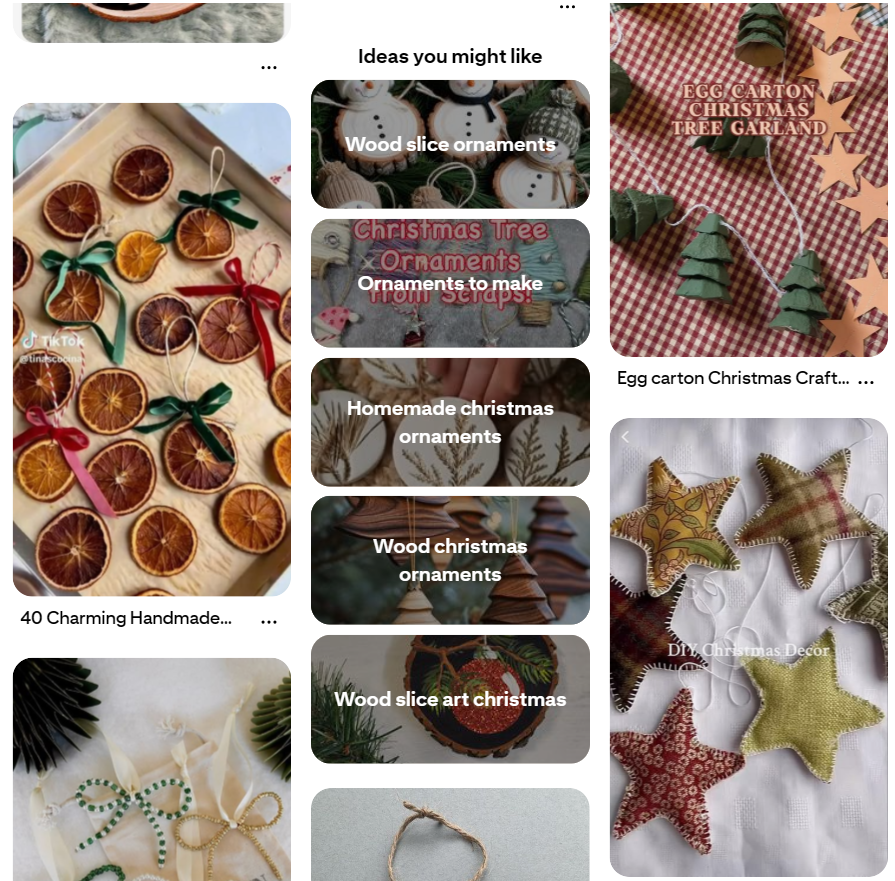
For example, when I searched “DIY Christmas ornaments” and clicked into a pin, Pinterest surfaced things like “Christmas ornaments crafts DIY,” “wood slice ornaments,” “homemade Christmas ornaments,” and “wood slice art Christmas.”
Not all of these make good board titles, some are better suited for individual pin titles or descriptions. But a couple, like “Homemade Christmas Ornaments” or “DIY Christmas Ornament Crafts” (rearranged slightly), work well as board titles. Again, how far you go depends on how much content you actually have on the topic. There’s no need to go granular if this is just a small bit of your content strategy.
Using Pinclicks (My Go-To Tool)
I love the Pinclicks tool and have been a subscriber for months. You can join the free trial (no credit card needed). This tool is not necessary, but I have to admit that it makes keyword research a lot easier for someone who’s on Pinterest as much as I am.
The process is as follows: Go to the Keyword Explorer, and in the filters, check “related interests” and “taxonomy” (both under Interests). Put your search phrase of interest, e.g. “vegetarian recipes”, then check “search suggestions” in the filters.
Pinclicks returns a list of keyword variations you can sort by volume: things like “vegetarian recipes dinner,” “healthy recipes vegetarian,” “vegetarian casserole recipes.” I don’t think you should necessarily chase the highest volume keyword. Sometimes a slightly lower-volume phrase is the better, clearer title.
From this list I like “Healthy Recipes Vegetarian” as a board title. Clicking into it, Pinclicks shows related interests too, like “easy recipes vegetarian,” “healthy eating vegetarian,” “healthy dinner recipes,” which is more useful material either for a board title, or to add to my board description.
The Free Google Trick
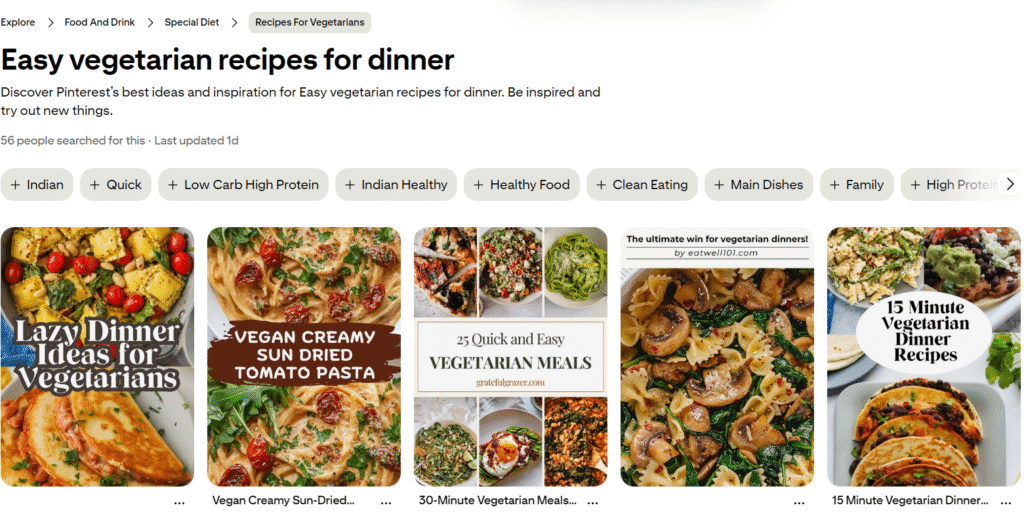
If you don’t want to pay for a tool, here’s a workaround. Search Google using site:pinterest.com/ideas "your keyword phrase", in quotes. Click through to one of the results and Pinterest will take you to an “idea” page showing actual search volume, related qualifier bubbles and a section called “Explore Related Boards.”
For example, I’m searching the following: site:pinterest.com/ideas "easy vegetarian recipes"
This returns a list, albeit not exhaustive, of Pinterest Idea pages related to the search phrase. After clicking on one of the results, I am directed to a Pinterest Idea page where there are losts of juicy keywords I can use in both board titles and descriptions.
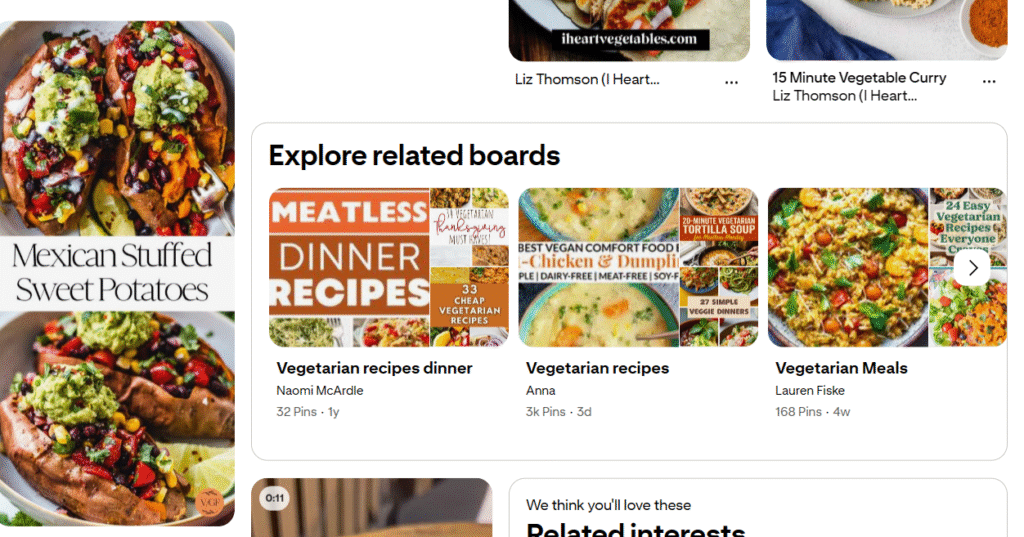
That “related boards” section can be a useful signal, but don’t take it as gospel. I’ve seen boards called things like “Yummy Food” or “Good Eats” show up there, and I still wouldn’t recommend titles that vague, even if Pinterest is technically surfacing them as related. Those accounts might have legacy pins carrying them, or be succeeding on a completely different metric than the one you care about.
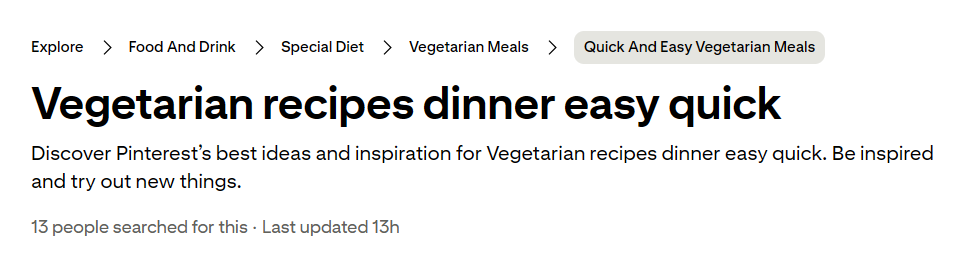
These idea pages are also structured like a menu, you can click through a path like Food and Drinks → Special Diets → Vegetarian Meals → Quick and Easy Vegetarian Meals, and at each level you’ll get a fresh set of related boards and keyword ideas to pull from.
Writing Board Descriptions
Once you’ve got your title, the description is where you get to use the more specific, granular keywords that didn’t quite fit the title itself. If the title is the umbrella, the description is where you list what’s actually under that umbrella.
Board descriptions have a 500-character limit, so pick your best, most obvious keywords rather than cramming in everything. Pinterest curates its own boards too, and you can see this if you check the Explore tab. Right now, for example, there’s one called “’90s Retro Revival” and another called “Handmade Mug Inspo.”
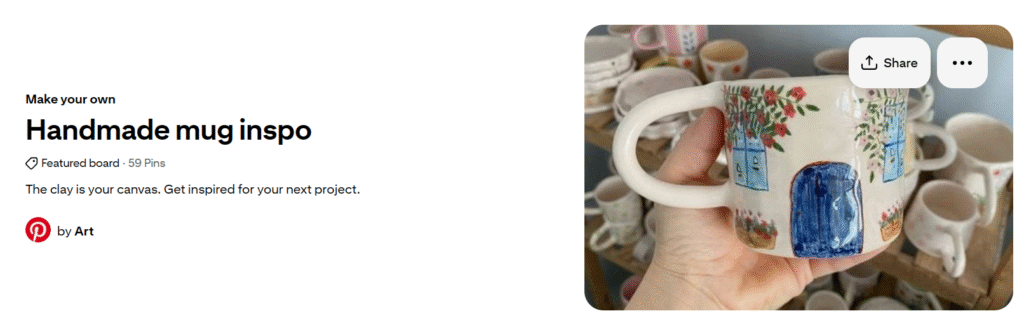
If you look at “Handmade Mug Inspo,” it’s a board by Pinterest by Art, and the description is just: “The clay is your canvas. Get inspired for your next project.” This is pretty straightforward. Pinterest isn’t doing too much, and honestly, I think that’s the right instinct to borrow, to keep it human and simple.
But Pinterest’s own descriptions are a bit thin on keywords, and we don’t have the luxury of being Pinterest. So while we should follow that same human-centered, simple approach, we still need to work keywords in, just within full sentences rather than a keyword list.
Something like: “Make dinner simple with these easy vegetarian recipes.” Then layer in a few more specific qualifiers naturally, like ones related to time (“ready in under 30 minutes”) or a light, conversational line (“No more asking what’s for dinner”).
It really doesn’t need to be complicated.
A Quick Reality Check
Sometimes Pinterest surprises me because you can be completely methodical with your keyword research and still find some random account doing great with a vague title and no description at all. When that happens, I remind myself I don’t actually know their full picture, they might be getting saves without outbound clicks (which, for me, is what actually counts as success), they might be a personal account rather than a business one, or they might just be an outlier.
My take is still: follow the keywords. It’s the best practice, even if it’s not the only path to doing well on Pinterest.
That’s it for now. Next up: Step 3, visual organization, board covers and headers.
Happy pinning!

One Comment